GEOANIMATOR JOURNAL
How to Highlight Countries With Flags on an Animated Map
Learn how to highlight countries with their flags on an animated map. Fill regions with flags, reveal them and export a video in GeoAnimator.

In this article10 sections
- 01How to Highlight Countries With Flags on an Animated Map
- 02Why Highlight Countries With Their Flags?
- 03Flag Fill or Solid Color: Which One Wins?
- 04What You Need Before You Start
- 05How to Highlight a Country With Its Flag, Step by Step
- 06Keep the Border Readable
- 07Pick a Reveal That Suits a Flag
- 08Highlighting Several Countries at Once
- 09Where Flag Highlights Work Best
- 10Frequently asked questions
How to Highlight Countries With Flags on an Animated Map
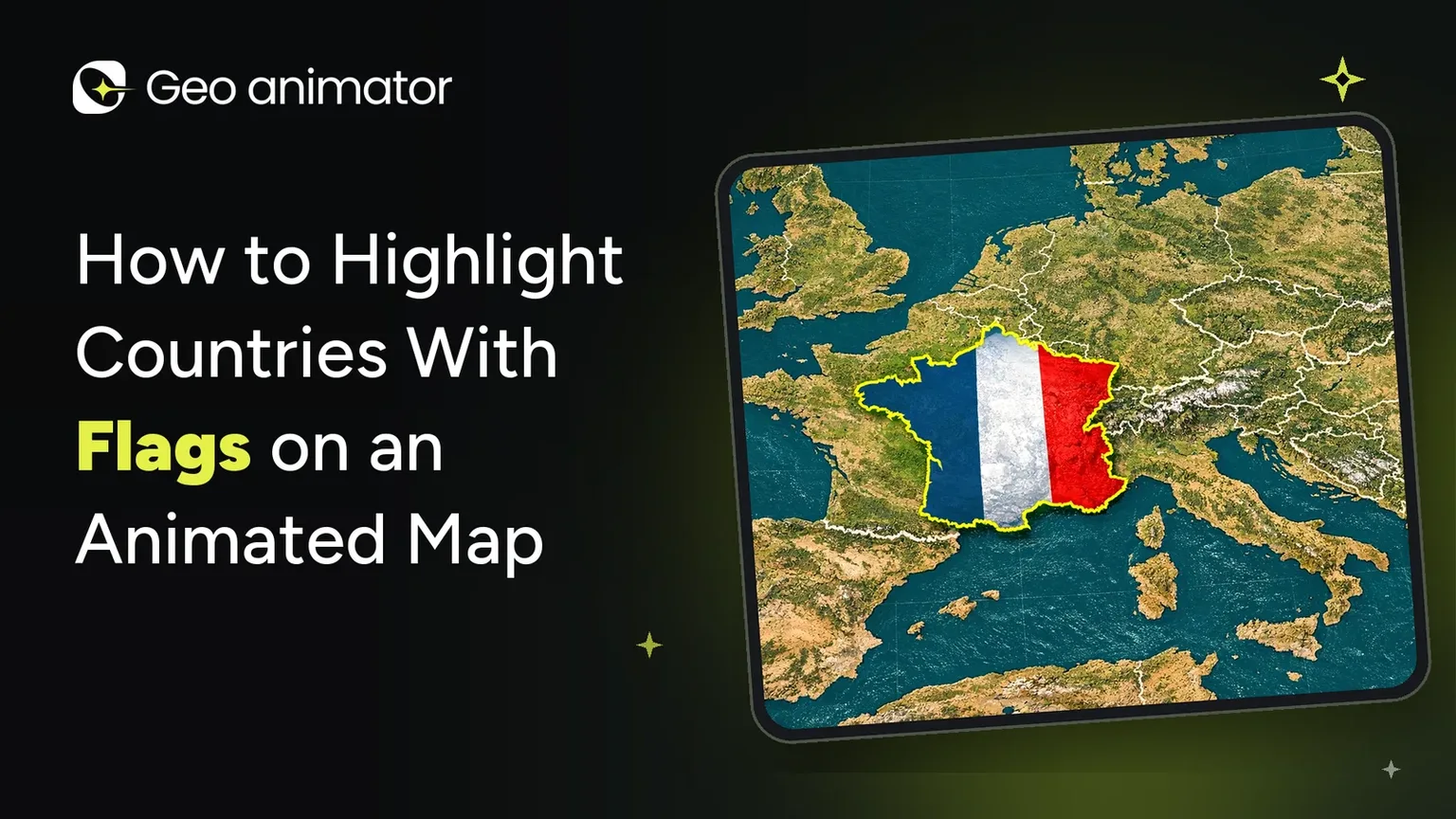
Picture a map where Brazil lights up in plain green. Fine, it works. Now picture the same country filling in with its actual flag, yellow diamond and all. Suddenly nobody needs a caption to know who they are looking at.
That is the quiet power of learning how to highlight countries with their flags. A solid color says “this place”. A flag says “this one, and you already know it”. It is faster to read, it works across languages, and it looks far more deliberate than a flat patch of paint.
This guide walks through the whole job in GeoAnimator, the Android map animation app: choosing a flag fill, keeping borders readable, revealing countries in order, moving the camera and exporting a clip for your platform.
Why Highlight Countries With Their Flags?
Maps are great at showing where. They are less great at showing who, especially when the shapes are small or unfamiliar. Can you pick out Slovenia on a world map at a glance? Most of us cannot. A flag gives the eye a second clue, and our brains are very good at flags.
There are a few practical reasons creators reach for them:
Instant recognition. A flag fill identifies a country even before the label appears.
No language barrier. A viewer who cannot read your caption can still match the colors to a country.
Better comparisons. When you show three or four countries side by side, flags keep each one distinct without inventing a color code.
Personality. Quiz videos, sports roundups and travel recaps all feel livelier when the map wears its colors.
Flag Fill or Solid Color: Which One Wins?
A flag fill is the better pick when the viewer needs to recognise a country, when you are naming a few countries in a row, or when the audience is learning geography. A solid color wins when you want to show a group as one idea, such as “countries in this alliance”, or when the flag would be too busy at the size the shape appears on a phone.
There is also a content point worth remembering. A flag fill shows a country today. It says nothing about old borders or dates, so if your video is about history, say on screen that the shapes are modern ones.
What You Need Before You Start
The app. GeoAnimator is an Android app, available on Google Play. There is no iPhone version, and the website is not an editor, so everything below happens in the app.
A plan. Write down which countries appear, in what order, and what you want the viewer to learn. Three or four beats is plenty for a short clip.
An output shape. Decide on 16:9, 9:16 or 1:1 first, because it changes how big each country looks.
A look at the plans. Exports from the free version carry a watermark, while Pro takes it off and adds every map style. If the video is for a client or a channel, plan around that. Current prices are shown in the app.
If you are still choosing a tool, the guide to picking a map animation maker is a good place to compare options first.
How to Highlight a Country With Its Flag, Step by Step
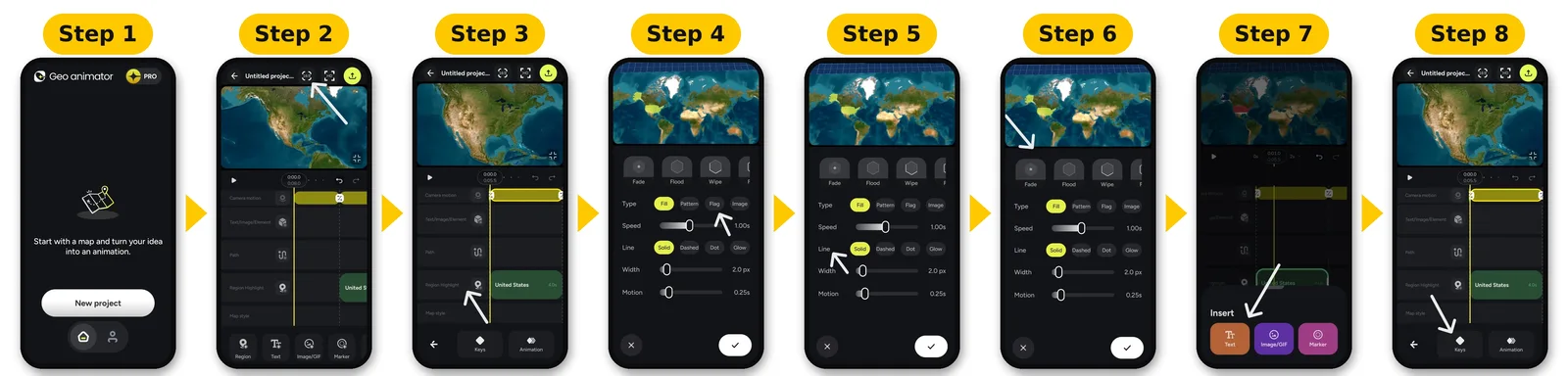
Here is the full loop. The first time takes a while, mostly because you are working out timing. After that it gets quick.
Open GeoAnimator on your Android phone and start a new project.
Choose your video format: 16:9 for YouTube or a presentation, 9:16 for Reels, Shorts and TikTok, or 1:1 for a feed post.
Search for the country and add it as a highlighted region.
Open the style options and choose the flag. The other choices are a solid color, a pattern or an image, so you can swap back and forth to compare.
Give the border its own settings, so the outline holds up against whichever map style you chose.
Choose how the country appears: Fade, Wipe, Flood or Chase.
Add a short title or a label for the country.
On the timeline, set a wide camera keyframe first, then a closer one on the country.
Preview the whole sequence and fix anything that feels rushed.
Export the video.
The same reveal and fill controls are covered from the solid-color side in the walkthrough on animating a country highlight map, which pairs nicely with this one.
One honest note: I have described the flow by what each control does rather than quoting exact menu names, so follow the labels you see in the app.
Keep the Border Readable
Here is where flag maps quietly go wrong. A flag is already full of color, so the edge of the country can melt into the map around it.
GeoAnimator lets you style the border separately from the fill, including its color and opacity. Use that. A thin, slightly darker line helps a small country stay findable on a handheld screen, and a pale line does the same on a dark map.
You can also add dimension with Rise, Dig or Hover, which lift or sink the country relative to its neighbours. Keep the height modest. A tall, dramatic Rise looks great for one country and starts to hide the neighbours when several are on screen.
Pick a Reveal That Suits a Flag
Fade is calm and works almost anywhere.
Wipe sweeps across in a direction. Try matching the sweep to the flag, for example along the stripes, and it looks tidy.
Flood pours the fill across the shape, which feels energetic for sports or news.
Chase sends a moving edge around the country.
Each reveal has settings for direction, speed, intensity and softness. A good rule is to pick a single reveal for the whole video and change only which country it lands on. After the first one, viewers get the rhythm and can look at the flags rather than the effect.
Highlighting Several Countries at Once
This is where flag highlights shine. Say you are making a clip about the Nordic countries. Their flags all feature the same cross design, so showing them one after another makes a lovely visual pattern.
Each highlight is a separate layer, which lets you space them out along the timeline. Start the second country a beat after the first is fully visible, and the viewer follows your sentence. The guide to the animated map of the United States goes deeper on staggering regions, and the same logic works for countries.
Keep the numbers sensible. Two or three flags on screen at once stay clear on a phone. By six, the frame feels like a weather forecast. If you have a long list, introduce them in groups and let the earlier ones stay visible but quiet.
If you want one shape instead of several, you can also fuse several countries into one custom region, carve areas out or sketch your own. That is handy for a group that has no single flag.
Where Flag Highlights Work Best
Classrooms. Geography quizzes, “guess the country” reveals and continent tours.
Sports and events. Tournament roundups and host-country intros.
Travel recaps. Show the countries you visited, then trace the journey. The guide to map animations for video has more ideas on that front.
News explainers. Fast “where is this” clips when a country is in the headlines.
Comparisons. Alliances, trade partners or any “these countries versus those” story.
If you usually work on a computer and ask yourself if desktop software is a must, the post on map animation without After Effects explains the phone-first alternative. And if you are weighing GeoAnimator against a browser tool, the AnimateMyMap alternative comparison lays the differences out.
Make Your First Flag Map
Pick three countries, give each its flag, choose one reveal and press preview. That small test teaches you more than any guide can. Get GeoAnimator on Google Play, and browse the GeoAnimator journal for more map video tutorials.
Frequently asked questions
How do I highlight a country with its flag on a map?
Add the country as a region in a map editor, then change its fill from a solid color to the flag. In GeoAnimator on Android you can also style the border separately and choose how the country is revealed.
Can I use a flag, a pattern or an image instead of a plain color?
Yes. GeoAnimator offers solid colors, patterns, flags and images as fill options.
Can I highlight more than one country with flags?
Yes. Give every country its own highlight, then space them out on the timeline so they arrive one by one.
Is there an iPhone version of GeoAnimator?
No. GeoAnimator is an Android app on Google Play, and the website is not an editor.
Which video formats can I export?
16:9 for YouTube and presentations, 9:16 for Reels, Shorts and TikTok, and 1:1 for square posts.